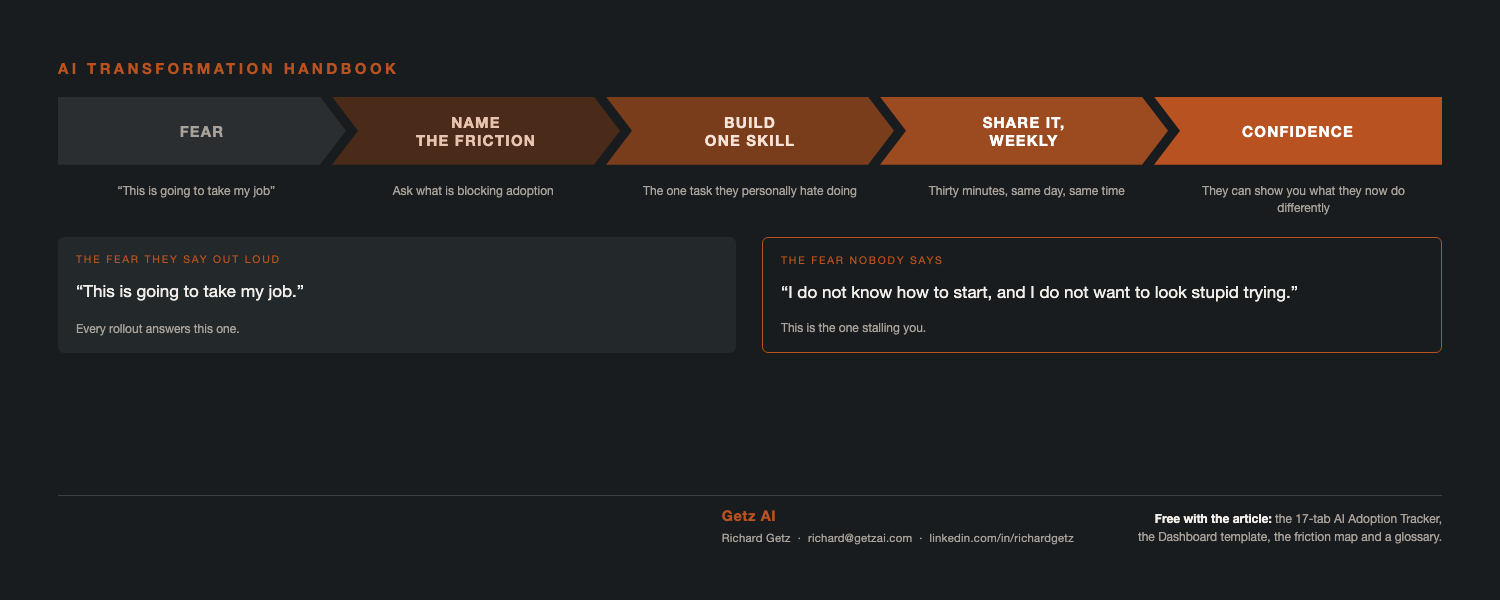
The two fears, and only one gets said out loud
Your people will say this one.
"This AI is going to take my job."
They will never say the other one.
"I do not know how to start with AI, and I do not want to look stupid trying."
The second one is what actually stalls adoption. Nobody raises a hand to admit it, so it never reaches your risk log, and no amount of training touches it. It shows up as quiet non-use, which you will not see until the license report lands.
Neither fear goes away with more training. Both go away the same way, with a win they can see, on work they already do.
Within a week they should be able to show you one thing they now do differently.
"It is going to take my job"
AI is not taking the job of the person who knows how to use it.
It is taking work off their desk. Different sentence, and one we can steer from fear to excitement.
An adopter who learns to prompt gets more done without working harder. Their deliverables get more accurate, especially reporting. They spend their attention on the value of the ask instead of fighting the format it has to arrive in.
Be honest with them, because people can smell a pitch. Some tasks really do go away. Assembling a status report by hand. Chasing six people for updates. Those are gone.
Neither was ever the job. The job is knowing what the status means and deciding what to do about it. AI did not take that part away, it handed them more of it.
What changes is the ratio. Less assembly, more judgment.
Give them the division of labor in plain terms:
🧠 They do the thinking. AI builds the deck.
🔍 They do the analysis. AI does the research and gathering that gets them there.
🎨 They decide what the image has to show. AI produces the chart, the diagram, the infographic.
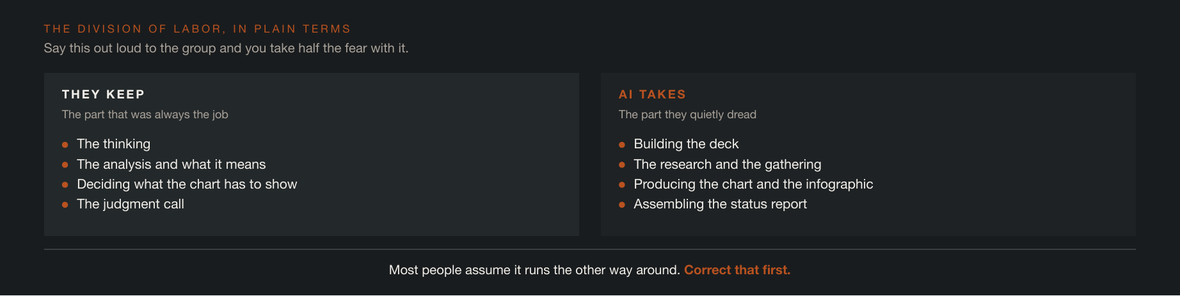
They keep the thinking and the judgment. AI produces the deliverable.
AI is very good at housekeeping, at summarizing, and at producing the artifact itself, the PDF, the deck, the spreadsheet, the infographic. Every deliverable people quietly dread is the part AI is genuinely excellent at. The deliverable was always the thing that ate the time and carried the anxiety.
Say that division out loud and you take half the fear with it. Most people assume it works the other way around, that AI does the thinking and they do the typing.
Say this part out loud
AI is here and it is not going away. It is a workplace tool now, the same as Excel was, the same as Asana was, the same as every platform your organization learned because the work required it. Nobody gets to sit this one out.
The person at risk is not the one whose tasks AI can help with. It is the one who never finds out. And it will not be a robot that replaces them. It will be the colleague at the next desk who learned it and got faster.
Say that to your teams, out loud. They already suspect it, and the silence is making it worse.
Ambiguity is what breeds fear, uncertainty and doubt. Say nothing and folks will fill the gap with the worst version they can imagine, and then manage their careers around it.
Decisive leadership is what rallies people. Tell them where this is going, tell them what you expect of them, then put somebody behind it. The skills and tools your end-users will actually run have to be built by a person, and it is not going to be the AI. Skip that part and the future state you sold them is worse than the one they had.
"I do not know how to start with AI"
It is not that they do not know how to start their day. It is that they have been handed a blank chat box and told it will change how they work. There is no obvious first move, no way to try something small, and a real fear of looking incompetent in front of people who seem to have figured it out already.
So do not start them at the blank box. Start them somewhere they already feel the friction.
How do we get people using a new tool?
Start with a need. Find something the tool genuinely solves for them, not a feature tour.
Then make it repeatable. You do not sit down and write instructions. You walk the AI through the task once, it writes the skill itself, and from then on it runs the same way every time for anybody who has it.
That is what we call an AI Skill. It is a skill for the AI, not a human skill.
Nobody has to learn to prompt anything at this point. Nobody has to be good at AI. The barrier to entry is as low as it gets.
Three frictions, three quick wins
Name the friction your people already feel, then hand them a pre-built AI Skill that removes it and watch adoption climb. The friction is what makes them afraid. The quick win is what makes them adopt.
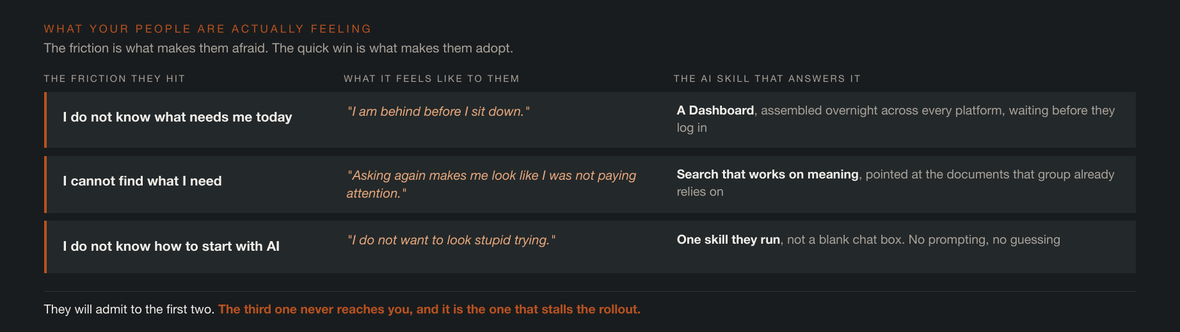
The friction is what makes them afraid. The quick win is what makes them adopt.
Lead with the Dashboard. You hand it to them already built and already running, zero barrier to entry.
Here is what I did for my team. I built the skill once, pointed it at the platforms we actually use, and it now runs every morning before anyone logs in. Nobody on the team writes a prompt. They open a page.
The friction: almost nobody begins the day knowing what actually needs them. Work is scattered across Slack or Teams, Asana or Jira, SharePoint or Google Docs, and email. Coming back from a weekend or a vacation, they are behind before they sit down.
The quick win: a Dashboard, built by an AI Skill, that pulls their action items, todos and critical awareness items out of every platform and puts them on one page, assembled overnight.
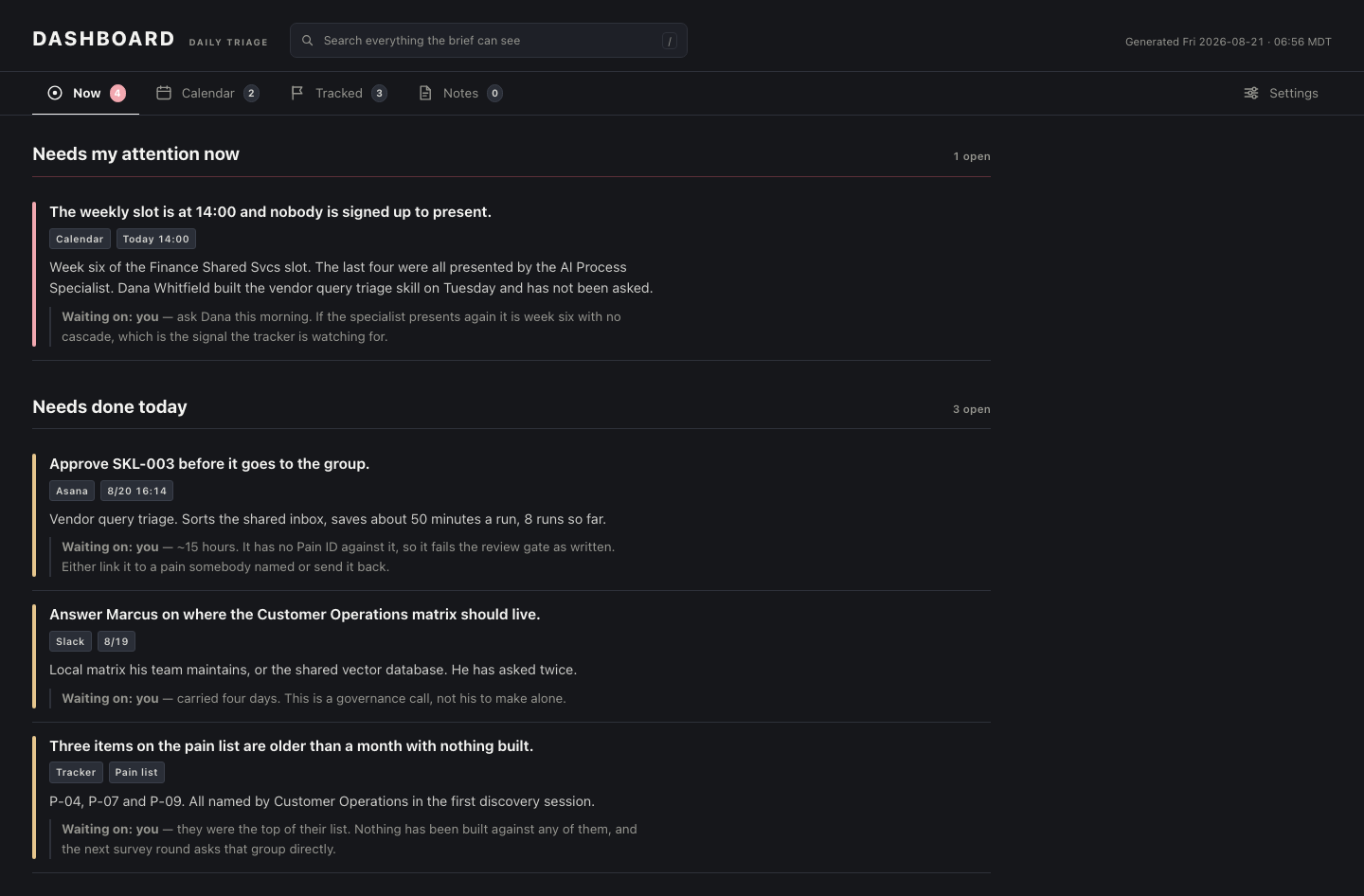
One page, assembled overnight: what moved, what is waiting, what is at risk.
That same skill and the HTML template it produces are on my site. Free, no form, no email capture. Download it, point your AI at it, and have it edit the skill to match your own platforms.
Once a team has one, they start asking for others. A ticketing view. An escalation view. A risk and mitigation view. That request is the adoption signal you have been waiting for, and it is the moment the program starts paying for itself.
"I cannot find it, and I do not know the answer"
The friction: "I need to provide an answer right now and I cannot find what I am looking for."
It exists somewhere. An SOP, a policy doc, a spreadsheet somebody built two years ago, a thread nobody can find. So they stop looking and ask a colleague, which costs two people instead of one and often comes back stale, delivered with confidence.
The quick win: point an AI Skill at the documents that team already relies on. It becomes a search tool that works on meaning rather than exact words. Ask it in plain language and it finds the file, or the paragraph inside the file.
Here is what I did for my team. I indexed our SOPs and reference docs. Now somebody asks in plain language and gets the answer back, not a folder to go dig through. The hunt that used to eat twenty minutes takes seconds.
I handled this two different ways. One is a local matrix for a single user. The other is a vector database on SharePoint that the whole team benefits from.
The matrix is one person indexing their own documents. Value the same day, no budget, no approval, and nobody has to sign anything.
The vector database is the company version, maintained automatically through connectors. That is the one that gets you compliance, accuracy and freshness. One maintained source, instead of forty people each keeping a private copy of the truth that quietly goes stale.
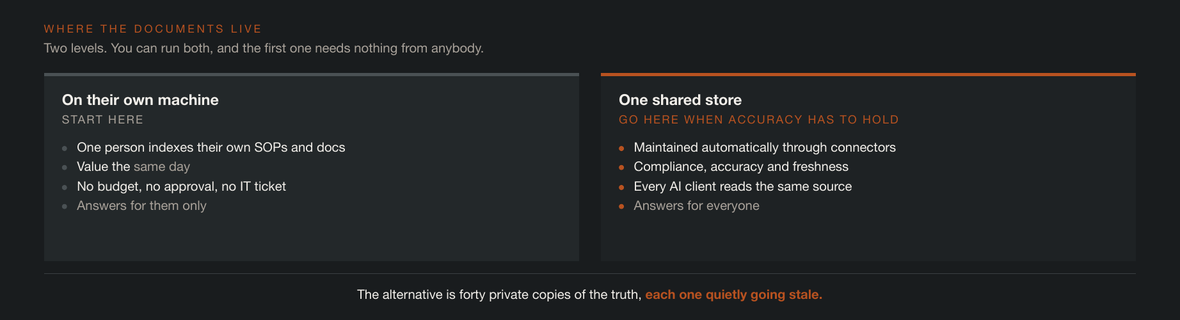
Start local for the same-day win. Go shared when accuracy and compliance have to hold.
Get this built for the team you are managing the change for, and watch adoption grow.
Who actually builds this
You need an AI SME with experience building skills, prompts, integrations and connectors, and who knows which tool to use and when. They map the SOPs, write the connectors into your platforms, build the skills, produce the dashboard templates, and document the whole thing so the team can run it without them.
The AI SME is not a champion and not a committee. One person, sitting with each team, listening to what they actually do all day, building the skills that do it.
The listening is the job. Most AI rollouts fail because somebody built what they assumed people needed, launched it, and could not understand why nobody used it. The AI SME works the other direction. Watch the work first, build second.
The Skill Reinforcement
Reinforcement is not another training session. It is people showing each other what they built.
Have them drive their own Dashboard in front of the team. Not you driving while they watch. Them, at the keyboard. The strong ones will be glad to show off, and the ones behind get to watch somebody they actually work with, which lands differently than a vendor demo ever has.
Add office hours and 1:1s. The person who is struggling will not raise their hand in a room full of people who already get it. Put it on the calendar so asking is not a favor.
Their job is to adapt the skill and bring back what did not fit. That feedback is the next version. If nobody has changed a skill to suit themselves by week six, they are not using it, they are watching it.
The other half is an hour or two a month with the AI SME, keeping the skills current as your platforms and processes change.
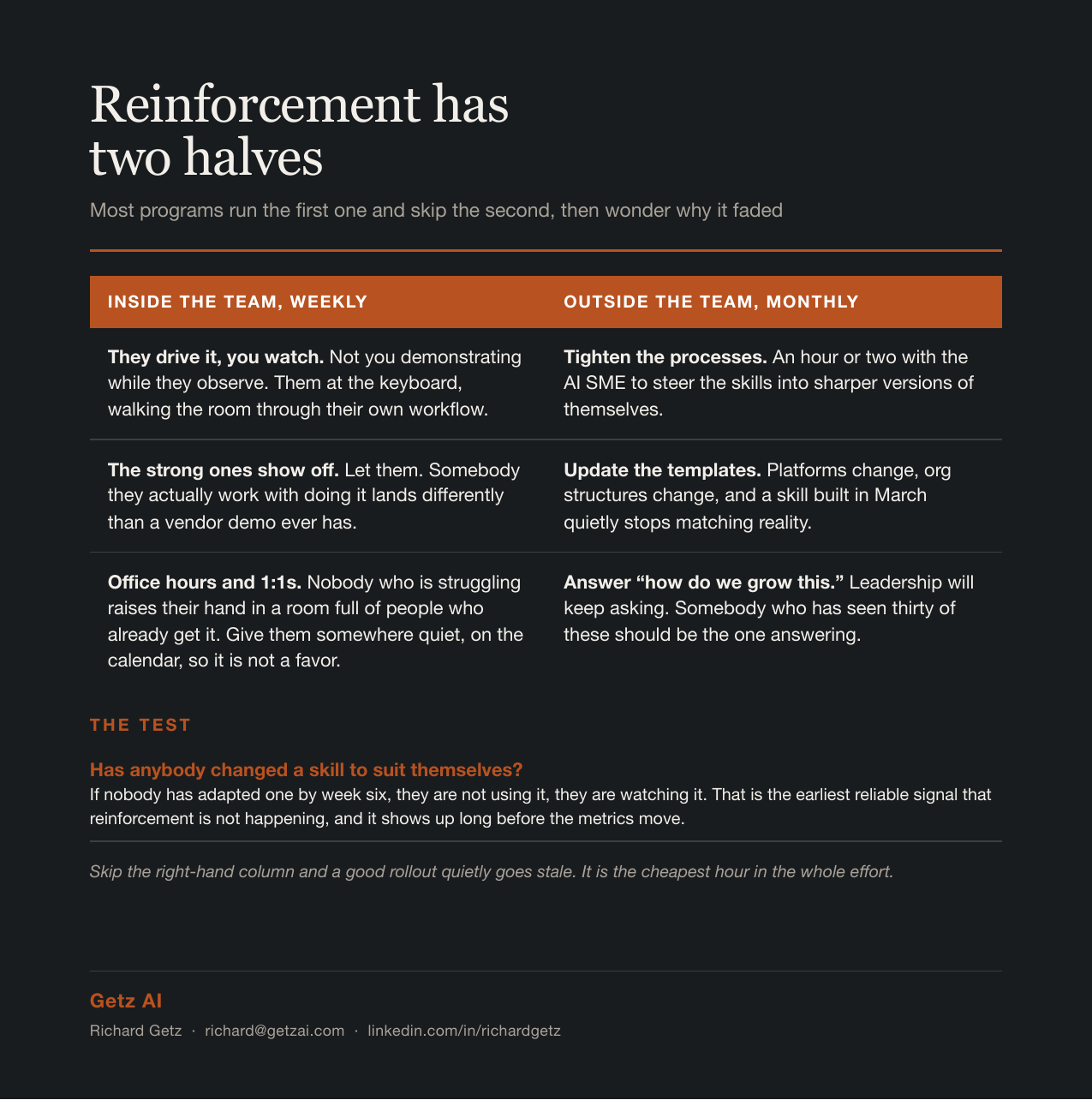
Reinforcement has two halves
The shift for a CM
Right now a change manager produces decks, sessions, job aids, and comms. All of it describes the new way of working, which is needed. It is the deliverable that reduces FUD.
Name the threat. You already know how to get a team to say out loud what actually hurts. Now sit in that room with your AI SME so what gets built maps directly to what they named. No translation layer, no requirements doc that loses it on the way.
Write the education plan and the engagement plan. Put the weekly slot on the calendar with a name against it. Pick who presents first. Decide now what happens in week three when the novelty wears off, not in week three.
Bring in the AI SME. This is not a promotion for your most enthusiastic person. It is an SME who already knows how to build AI workflows and skills, because that is a craft and it takes reps to get good at. Hand them the friction list, protect their time, and tell the org out loud that building this is the job.
Work with them to build it. You bring the SOPs, the audience map, and the definition of done. They bring the skills, the templates and the workflows. This is not a handoff and a review, it is sitting together while it gets built. Check each one against the friction list before it ships. If nobody named it, do not build it.
Measure and steer. Two numbers to start: tasks retired per person, and how many folks brought something back this month.
The CM Workflow
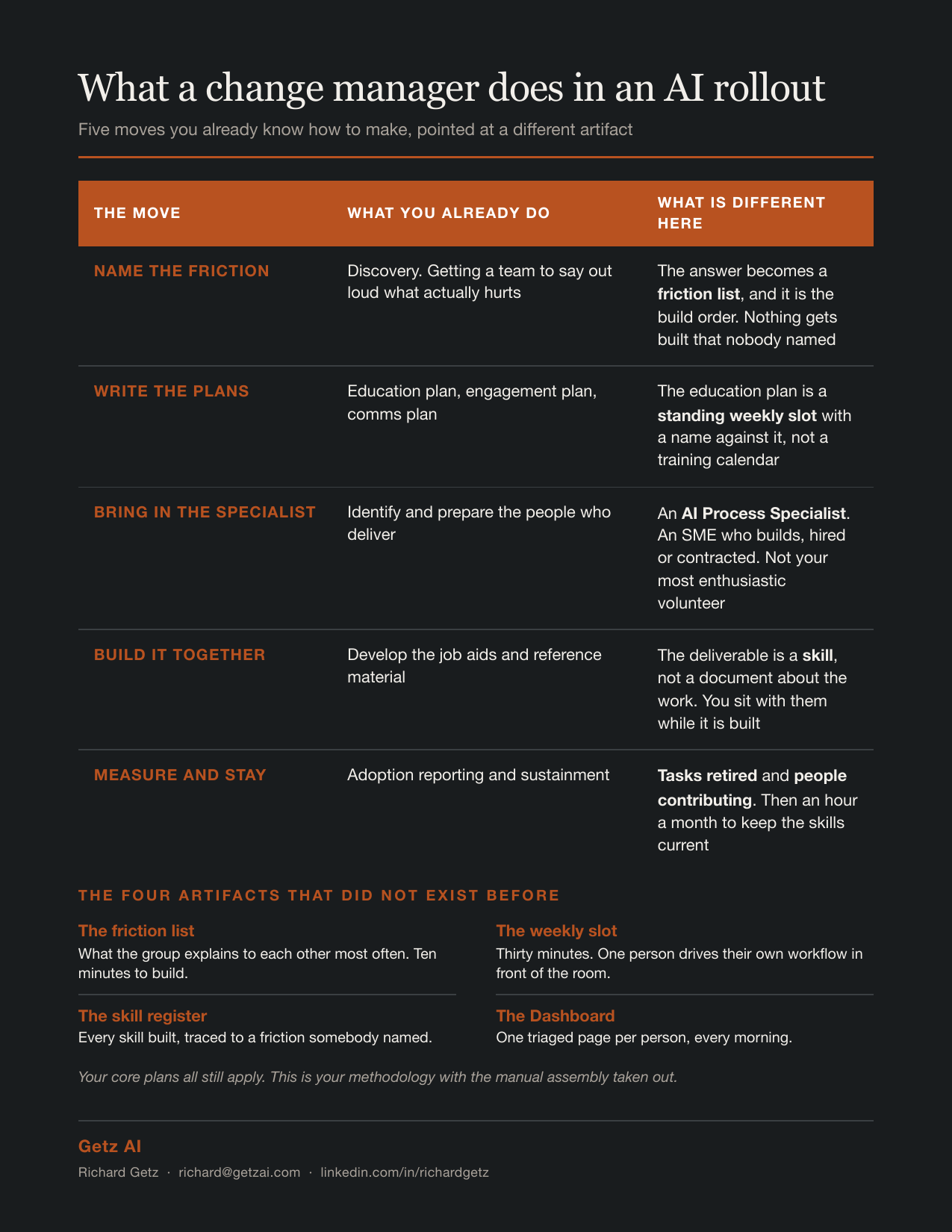
What a change manager does in an AI rollout
These are your own deliverables. The left column is the work you already do by hand every engagement. The right column is that same work, built once as a skill and handed to whoever needs it next.
What you build by hand | What it becomes |
|---|---|
Stakeholder analysis | Drafts the stakeholder map from project docs and the org chart |
Readiness assessment | Turns raw survey responses into a readiness heatmap by team |
Communications planning | Generates the comms calendar from milestone dates and audience list |
Sponsor plan | Turns the roadmap into a specific dated ask per sponsor, not “be visible” |
People manager plan | Builds the manager talking points from the actual resistance log |
Training plan | Maps the skill gap per team and drafts the session outline for each |
Job aids and quick reference | Turns any workflow doc into a one-page reference card |
Resistance tracking | Reads tickets and chat, flags where resistance is actually clustering |
Feedback triage | Sorts incoming feedback by which friction it is really about |
Go-live readiness | Assembles checklist status from the real systems instead of asking six people |
Adoption reporting | Pulls activity across platforms and reports what moved and what did not |
Your core plans are all in there. Communications, sponsor, people manager, training, and resistance management. It is your methodology with the manual assembly taken out.
Not one of them is "write my emails for me." Every one is a task you already do, done the same way every time, by anyone on the team.
Pick the one you did most often last year. That is your first skill, and you already know the steps.
Why this is quick adoption
Traditional adoption asks people to change behavior first and rewards them later, if at all.
Skills invert it. The reward arrives on the first run. The thing they were dreading is already done. Behavior change follows the payoff instead of preceding it.
And you get something you never get from training alone: when somebody runs a skill and it does not work for their situation, they tell you. Loudly and specifically. That complaint is the most valuable adoption data in the program, and no survey was ever going to surface it.
The whole thing, mapped
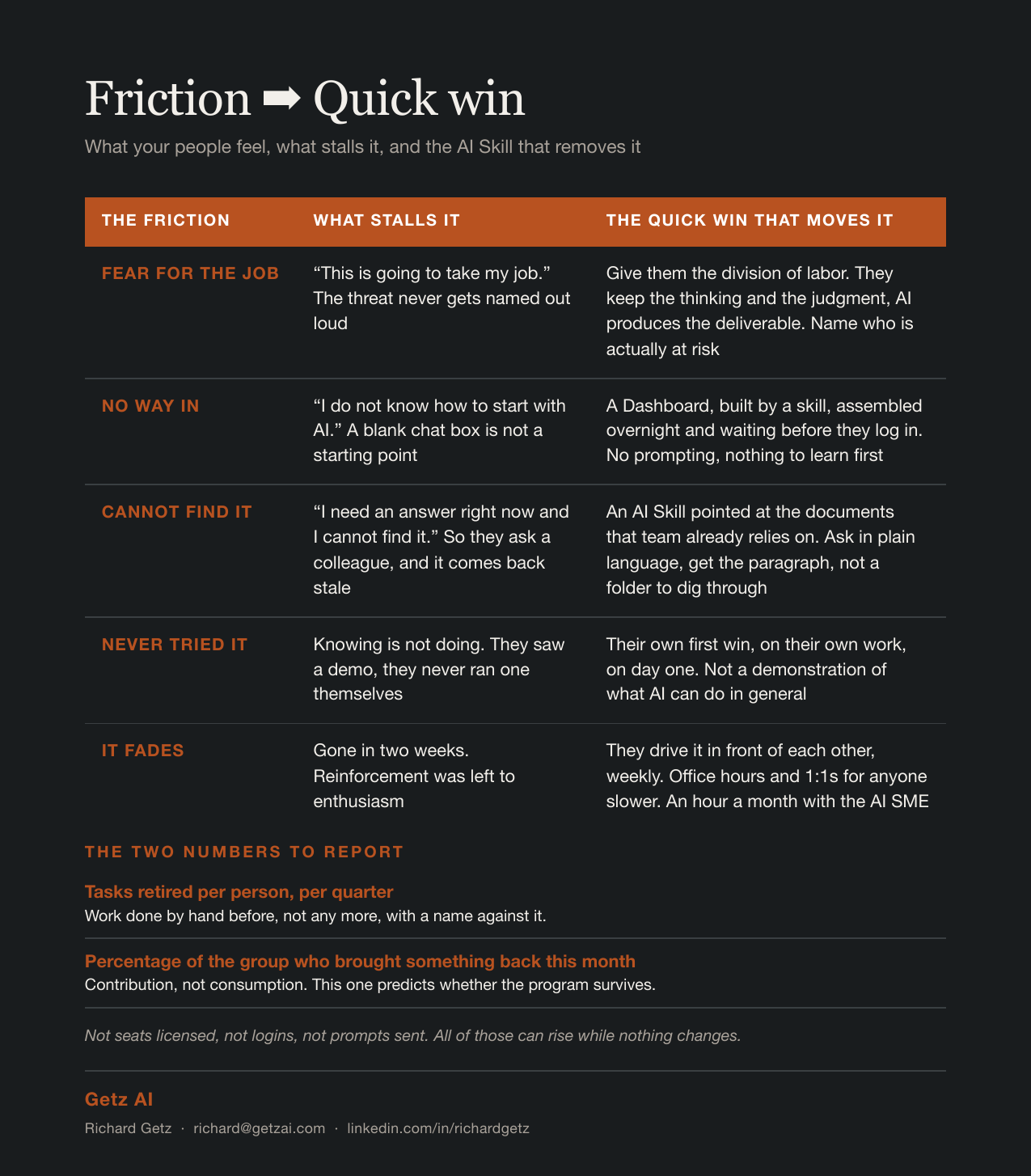
Friction to quick win
One shape, repeated: name what people feel, then hand them the skill that removes it.
What they feel | What stalls it | The quick win that moves it |
|---|---|---|
This is going to take my job | The threat is never named out loud | Give them the division of labor. They judge, AI produces |
I do not know how to start with AI | A blank chat box is not a starting point | A Dashboard, built by a skill, waiting before they log in |
I cannot find it, and I do not know the answer | The answer exists and nobody can find it | An AI Skill on the team’s own documents. Ask in plain language |
Knowing is not doing | They saw a demo, they never ran one | Their own first win, on their own work, on day one |
It fades after two weeks | Reinforcement was left to enthusiasm | A standing weekly slot, and numbers that count retired work |
Run whatever change methodology your house already uses. This just gives you a different artifact to put at each step.
Reference and leave-behinds
Glossary of Terms
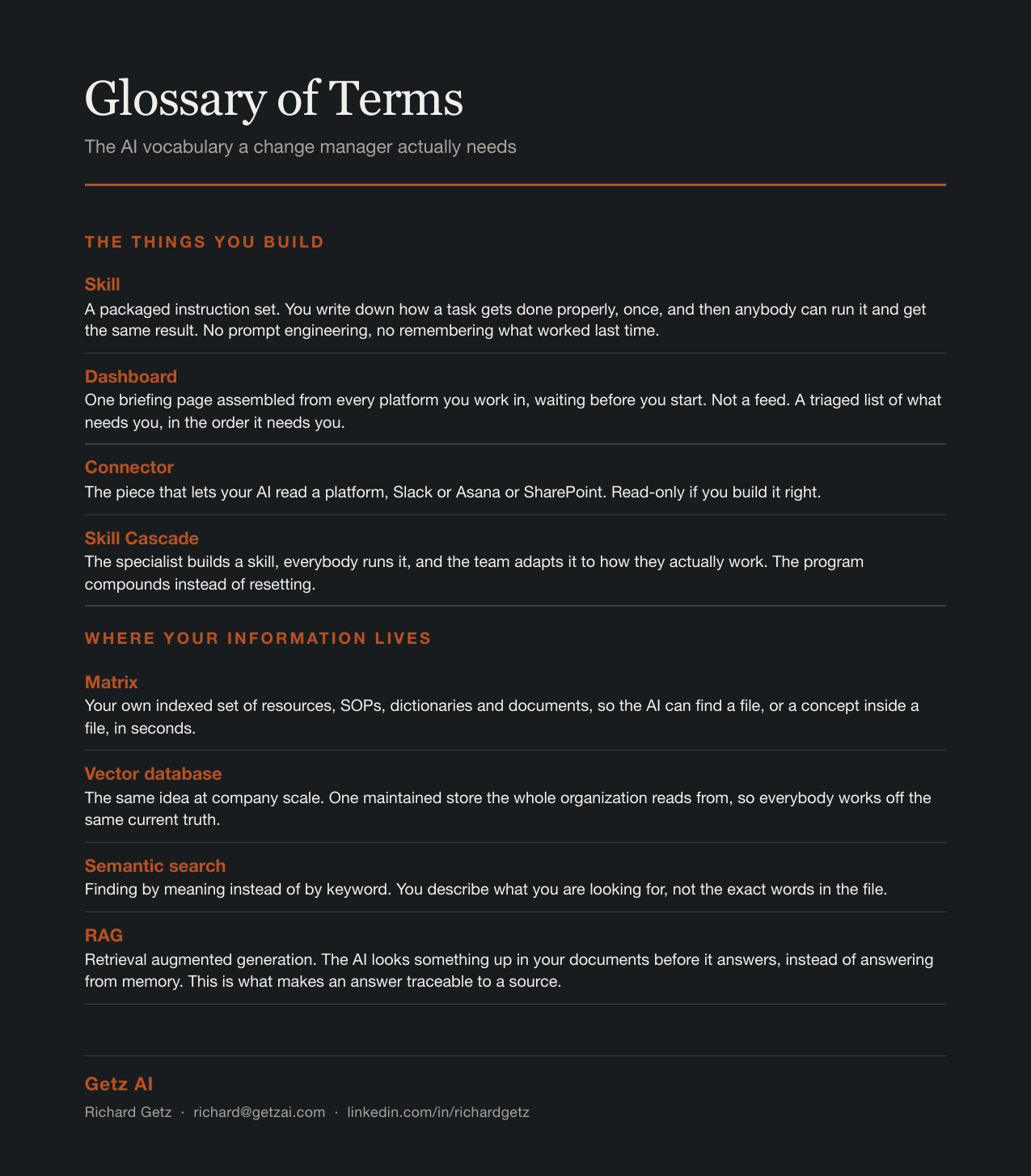
Glossary of Terms
Skill. A packaged instruction set. You write down how a task gets done properly, once, and then anybody can run it and get the same result. No prompt engineering, no remembering what worked last time, no depending on the one person who is good at this. It is the first time the "how" has been portable. A training session scales one room at a time. A skill scales the moment you send it.
Dashboard. A single briefing page assembled from every platform you work in, waiting before you start. Not a feed. A triaged list of what needs you and in what order.
Connector. The piece that lets your AI read a platform, Slack or Asana or SharePoint. Read-only if you build it right.
Matrix. Your own indexed set of resources, SOPs, dictionaries and documents, so the AI can find a file, or a concept inside a file, in seconds.
Vector database. The same idea at company scale. One maintained store the whole organization reads from, so everybody is working off the same current truth.
API. How software talks to other software without a person copying and pasting between them.
Semantic search. Finding by meaning instead of by keyword. You describe what you are looking for, not the exact words in the file.
Skill Cascade. The AI SME builds a skill, everybody runs it, and the team adapts it to how they actually work. The program compounds instead of resetting.
AI SME. A subject matter expert with experience building skills, prompts, integrations and connectors, who knows which tool to use and when. Usually hired or contracted rather than promoted from inside, because building this well is a craft. They sit with each team, watch what those people actually do, and build the skills, templates and connectors that do it.
The leave-behinds
Everything referenced in this article is on my site. Free, no form, no email capture.
Leave-behind | What it is | Get it |
|---|---|---|
Dashboard template | The HTML the Dashboard skill produces. Open it, point it at your own platforms. | ZIP · 56 KB |
Friction to Quick Win | The whole thing on one card. Pin it up or drop it in your own deck. | PDF · 82 KB |
Glossary of Terms | Every term used in this article, defined for a change lead. | PDF · 74 KB |
AI Adoption Tracker | Seventeen tabs mirroring the instruments you already keep, with the AI columns added on the right. The first eight are the spine if you want to start smaller: friction list, readiness, resistance, comms, sponsor, skill register, weekly cascade, adoption metrics. Training and people manager plans sit further back. | XLSX · 43 KB |
Take them, change the column names to match your house, and use them.
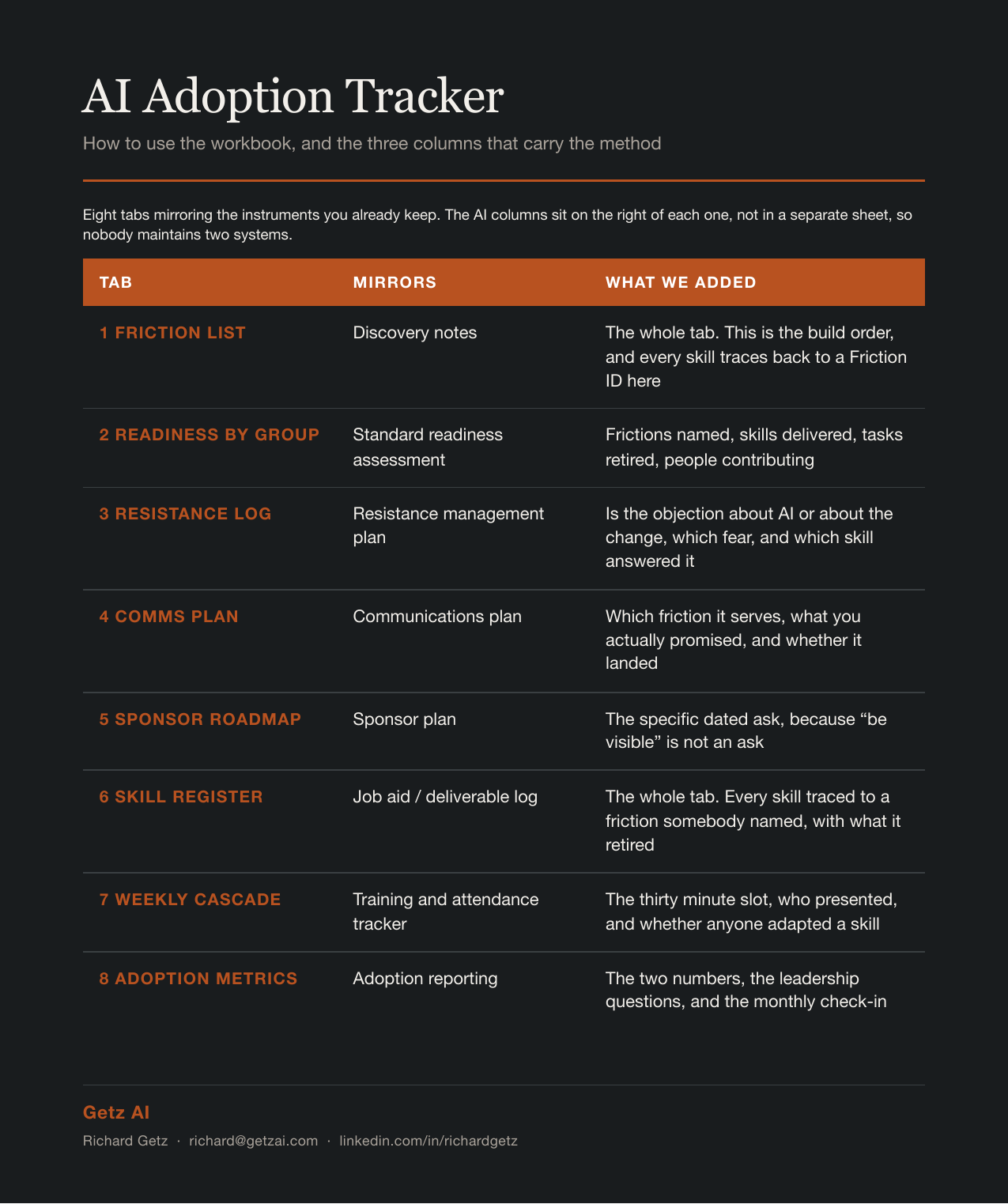
AI Adoption Tracker guide
One ask
If you run this and something works, tell me which skill and which team. If it stalls, I want to hear that more. Everything above came out of building it for my own team, and the version I hand out next gets better every time somebody reports back.
Richard Getz | richard@getzai.com | linkedin.com/in/richardgetz